

Pay Cat Toolbox · Classification report
Is anyone overdue for a pay point? Check your whole team in one run.
Under the SCHADS Award, employees can become eligible to move up a pay point as they build time at their classification. Toolbox shows the hours and days each employee has worked at each classification, so you can see who may be due to move up a level or pay point.
$2 per active employee per month, added to your Pay Cat Payroll plan. No new contract.
Not on Pay Cat Payroll yet? Book a demo
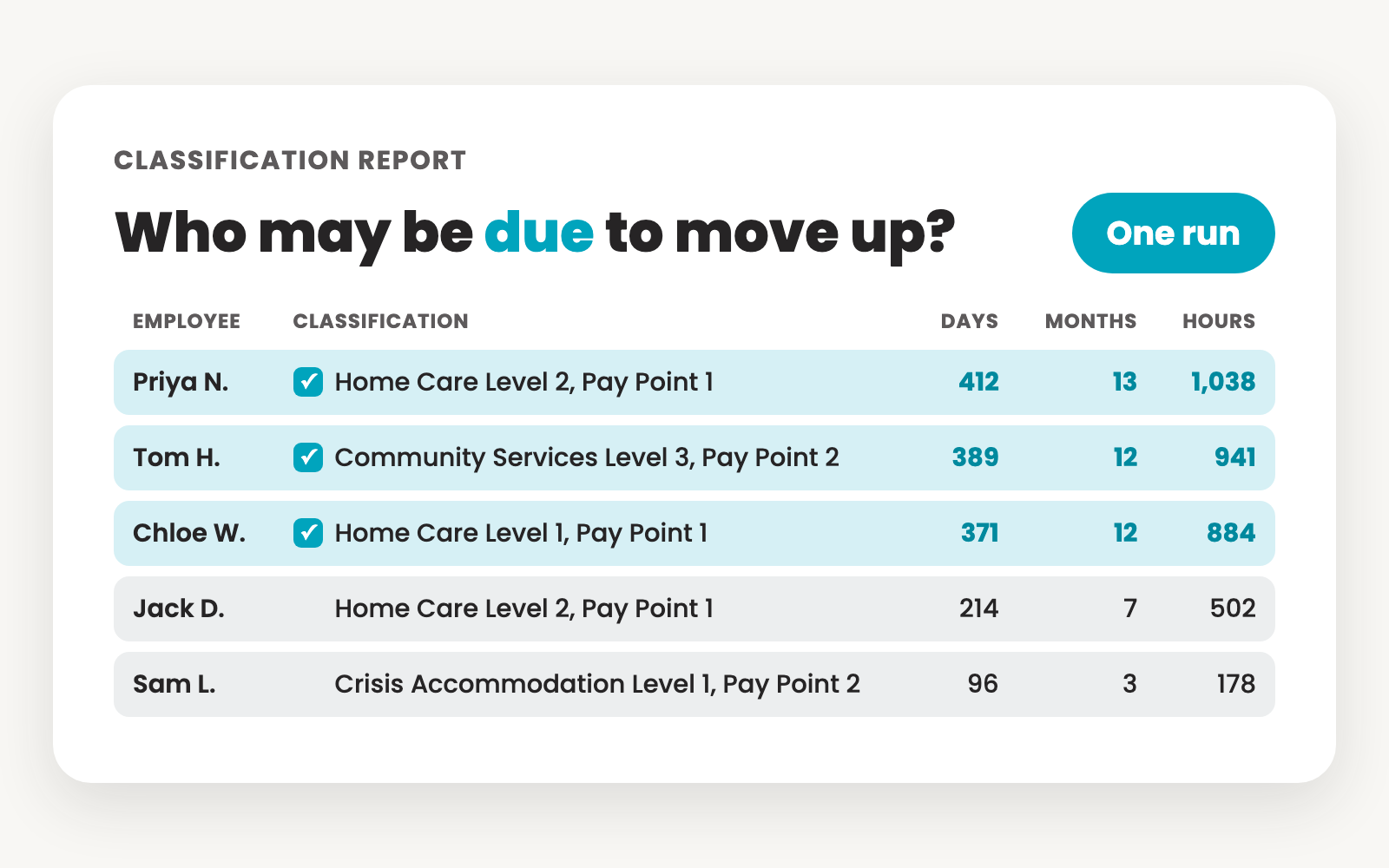
Why is pay point progression so easy to miss?
Because nothing prompts you, and the rules differ from level to level.
The rules change by level
Some levels start higher depending on qualifications. Most others become eligible to move up after 12 months at the current pay point. Social and community services, crisis accommodation and home care each word it differently.
Nothing tells you when someone is due
Start dates and classifications sit in payroll, but the days and hours at each classification take work to pull together. So the check ends up in a spreadsheet, or in someone's head.
Eligible doesn't mean automatic
The Federal Court has clarified that being eligible for the next pay point isn't the same as being moved up. The employer has to decide whether the criteria have been met, and that decision needs evidence.
So progression often only gets reviewed when someone raises it, or an audit does. The Classification Report puts every employee's time at their classification in one place, so the decision is made on facts rather than memory.
Free live webinar · Thursday 22 October
Meet Pay Cat Toolbox: nine tools for the worst jobs in SCHADS payroll
Tasya O'Connell, our Head Trainer, runs all nine Toolbox tools live on a real business file, including the Classification Report, so you can spot pay point changes before they turn into back pay. Bring your trickiest payroll questions for the live Q&A.
12pm AEDT (11am Brisbane, 11:30am Adelaide, 9am Perth). Online and free. Can't make it live? Register anyway and we'll send you the recording.
See it in action
Watch Toolbox show who may be due to move up
Under a minute. Every employee's time at their classification, in one run.
What does the Classification Report show?
The time each employee has spent at their classification, in one tab. You get it for your active employees, looking back three years from the day you run it.
Who they are
Employee name, employee ID and the date they started with you.
Current classification
Their classification and employment type: full time, part time or casual. It shows Unknown if the employee has no award or employment agreement set up.
Previous classification
The classification they held before, where it has changed.
Time at the classification
The date they started at it, and the days and months they have been assigned to it.
Hours worked
All the hours worked at that classification, including overtime. Casual employees are included too.
A record of each run
A Classification: Diagnostics tab with the report name, last run date, UTC run date and row count.
The report only includes active employees who haven't been terminated.
What happens when pay points aren't progressed?
In October 2026, disability services provider Sunnyfield signed an Enforceable Undertaking with the Fair Work Ombudsman. Employees had been underpaid because they weren't moved to their correct pay points.
Current and former employees
1,767
underpaid between 2018 and 2024.
Including super and interest
About $5.43 million
in underpayments.
Average underpayment
$3,078
per employee, and up to $23,378 for one person.
The affected employees were community support workers, service coordinators, team leaders and service managers, in full-time, part-time and casual roles. The underpayments reached base rates, casual loading, weekend penalties, overtime, shiftwork penalties, annual leave, personal leave, community service leave and public holiday payments.
Sunnyfield reported the problem to the Fair Work Ombudsman itself, after an external payroll audit in October 2024. The Ombudsman's message to employers was plain: "Employers should not assume long-standing payroll practices, including on pay point progression, are compliant."
Source: Fair Work Ombudsman media release, October 2026.
Catch it early
Don't wait for an audit to check pay points.
Run the Classification Report, see who has reached the point where they may be due to move up, and make the decision with the evidence in front of you.
A gap you find this month is a fix in the next pay run, not years of back pay.
How do pay points work under the SCHADS Award?
Most progression comes down to time at the current pay point, plus satisfactory performance. Here is how it works by level.
Social and community services Level 1
Where they start
Usually Pay Point 1. Pay Point 2 if their duties include the full range of domestic tasks.
When they may move up
Pay Point 2 after 12 months of industry experience. Pay Point 3 after a further 12 months of continuous service and satisfactory performance.
Social and community services Level 2
Where they start
Pay Point 2 with a Certificate IV, otherwise usually Pay Point 1.
When they may move up
After 12 months of satisfactory full-time equivalent service, with demonstrated competency and new skills.
Social and community services Level 3
Where they start
Pay Point 3 or higher with a three-year degree. Pay Point 4 or higher with a four-year degree doing Level 3 duties.
When they may move up
After 12 months of continuous employment and satisfactory performance at each pay point.
Crisis accommodation Level 1
Where they start
At least Pay Point 2 for graduates doing qualification-related duties.
When they may move up
Pay Point 3 after 12 months of satisfactory full-time equivalent service at Pay Point 2.
All other levels
This covers social and community services Levels 4 to 8, crisis accommodation Levels 2 and 3, and every family day care and home care level.
When they may move up
Eligible after 12 months of continuous service at the current pay point, with satisfactory performance and new or enhanced skills.
Eligible doesn't mean automatic. The employer decides whether the criteria have been met. The Classification Report gives you the hours, days and months to base that decision on.
Source: SCHADS Award (MA000100) and our blog post SCHADS Award pay rates and progressions explained.
Already using Pay Cat?
Toolbox is ready to install. No demo, no waiting.
I'm a Pay Cat customer, take me to the Pay Cat Toolbox!What does it cost?
$2
per active employee per month
A provider with 40 active employees pays $80 a month.
✓Added to your existing Pay Cat Payroll plan, with no new contract
✓Billed like Pay Cat Payroll: only for employees active that month
✓Includes every Toolbox report, not just portable long service leave
✓New reports are added at no extra cost
Questions people ask before turning Toolbox on
Pay Cat Payroll with Toolbox is $11 per employee, per month. That covers the payroll platform and all nine Toolbox tools, Employee Updater through to the SCHADS 5-Week Annual Leave Assessment. There is no separate fee per tool.
Already on Pay Cat Payroll? Adding Toolbox is an extra $2 per employee, per month, taking your subscription from $9 to $11.
Toolbox is charged on your active employee count, the same basis as your Pay Cat Payroll subscription, and it is only available to Pay Cat customers with an active API key. See our pricing page for the full breakdown and exact terms.
Install the app and click the link under "support" to access the set-up guide. Got questions? Reach out to support.
Yes, but a free Gmail account is enough, you don't need a paid Google Workspace subscription. Toolbox is a Google Sheets™ extension, so you'll need a Google account to install it and run it in a Google Sheet.
No. Everything runs from menus inside Google Sheets. If your team is comfortable in a spreadsheet, they're already comfortable in Toolbox.
No. Toolbox is built for Google Sheets only, not Excel. Once you've generated a report, though, Google Sheets can export it straight to XLSX format if you need the file in Excel.
Make a copy of the spreadsheet, or duplicate the generated data tab, before a big update. That way there's always a clean copy to fall back on if something needs a second look.
Ready to get Toolbox working for your team?
Two ways in, depending on where you are with Pay Cat.
Already with Pay Cat
Add Toolbox to my accountNo demo needed. Install straight from the Google Workspace Marketplace.
New to Pay Cat
Book a demoSee Toolbox running against a real business file, alongside the rest of Pay Cat.