

Pay Cat Toolbox · Redundancy Template
Build a redundancy worksheet in Google Sheets.
Enter the termination details and choose the employee. Toolbox generates a payroll worksheet, then an HR worksheet, as tabs in your sheet.
A payroll worksheet and an HR worksheet
$2 per active employee per month, added to your Pay Cat Payroll plan. No new contract.
Not on Pay Cat Payroll yet? Book a demo
Why is a redundancy payment hard to put together?
It is more than one amount, and the figures come from different places.
Several amounts in one payment
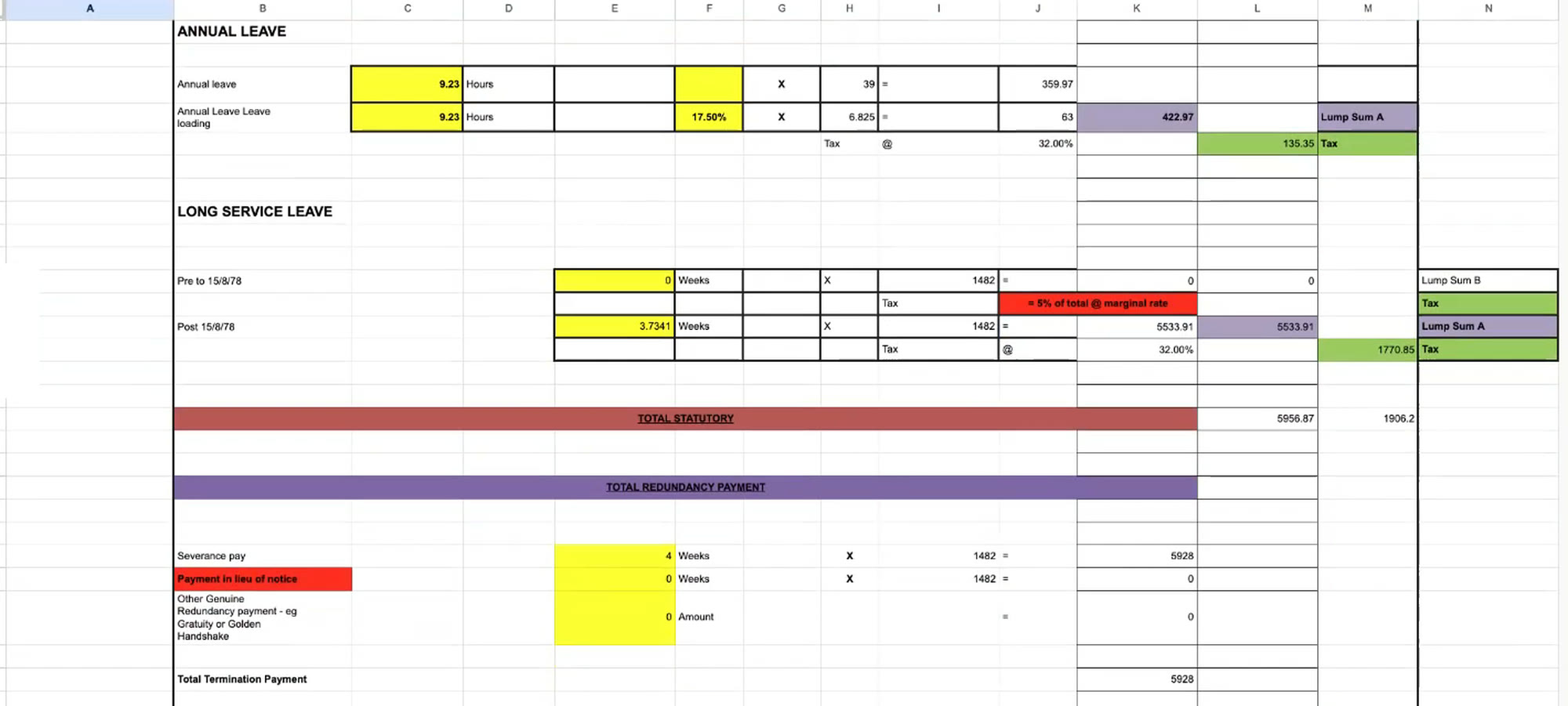
The worksheet lists annual leave and leave loading, long service leave, severance pay, payment in lieu of notice and any other genuine redundancy payment.
Dates and pay rates feed the figures
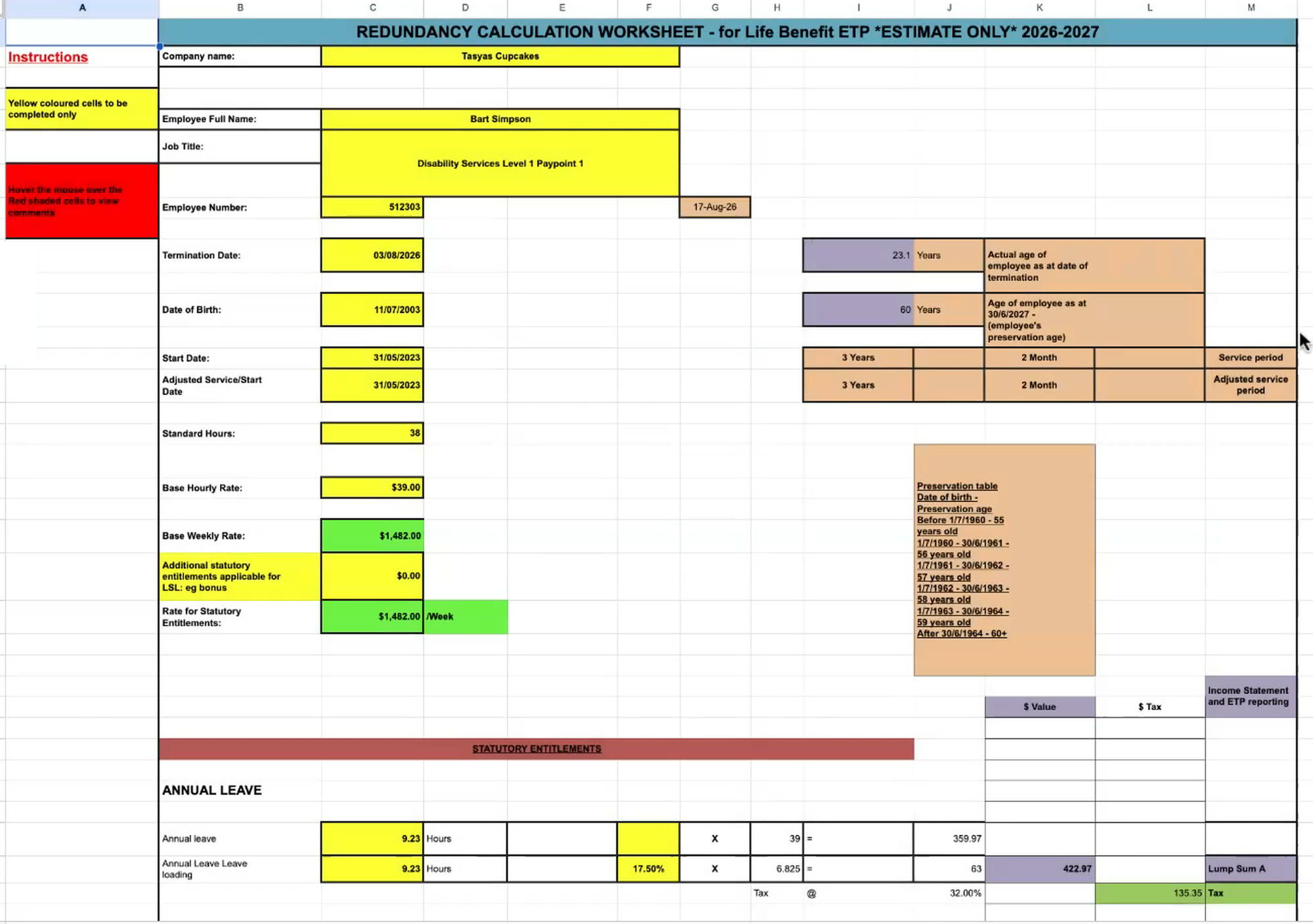
Date of birth, start date, standard hours and pay rate all sit on the worksheet, alongside the age and service period worked out from the dates.
The payment is split into parts
The worksheet shows tax free and taxable amounts, with a tax column, and ends in a net payment.
Toolbox lays all of this out in a worksheet in your Google Sheet.
See it in action
Watch the Redundancy Template build both worksheets
Two short videos. First the payroll worksheet, about a minute and a half. Then the HR worksheet, about half a minute.
1. The payroll worksheet
2. The HR worksheet
How does the Redundancy Template work?
Five steps. You only connect once.
1
Connect once
Install Toolbox in Google Sheets and paste in your Pay Cat Payroll API key. That's the most technical it gets.
2
Open the template
Go to Extensions, then the Toolbox menu, then Payroll, then Redundancy Template, and click Generate Template.
3
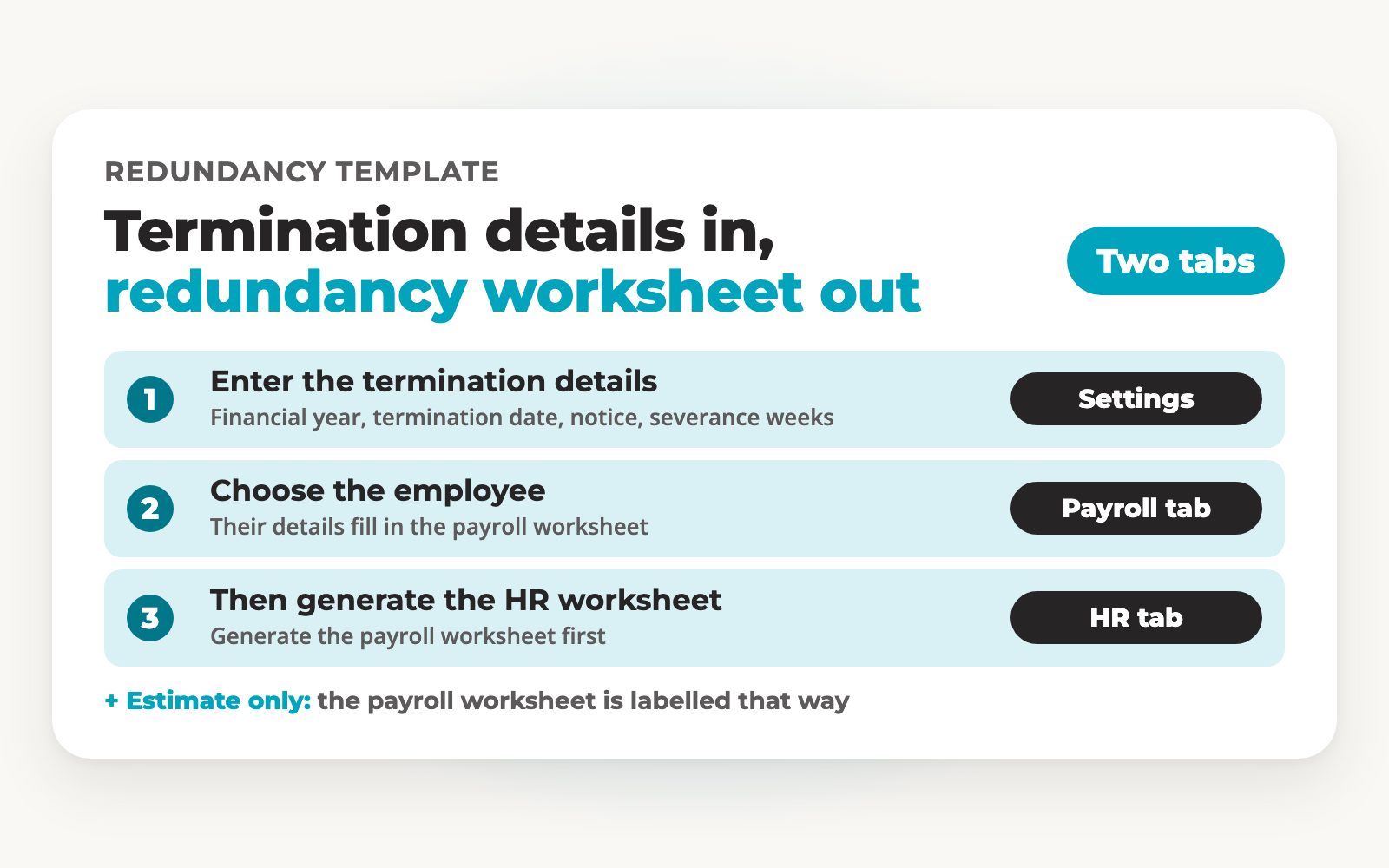
Enter the termination details
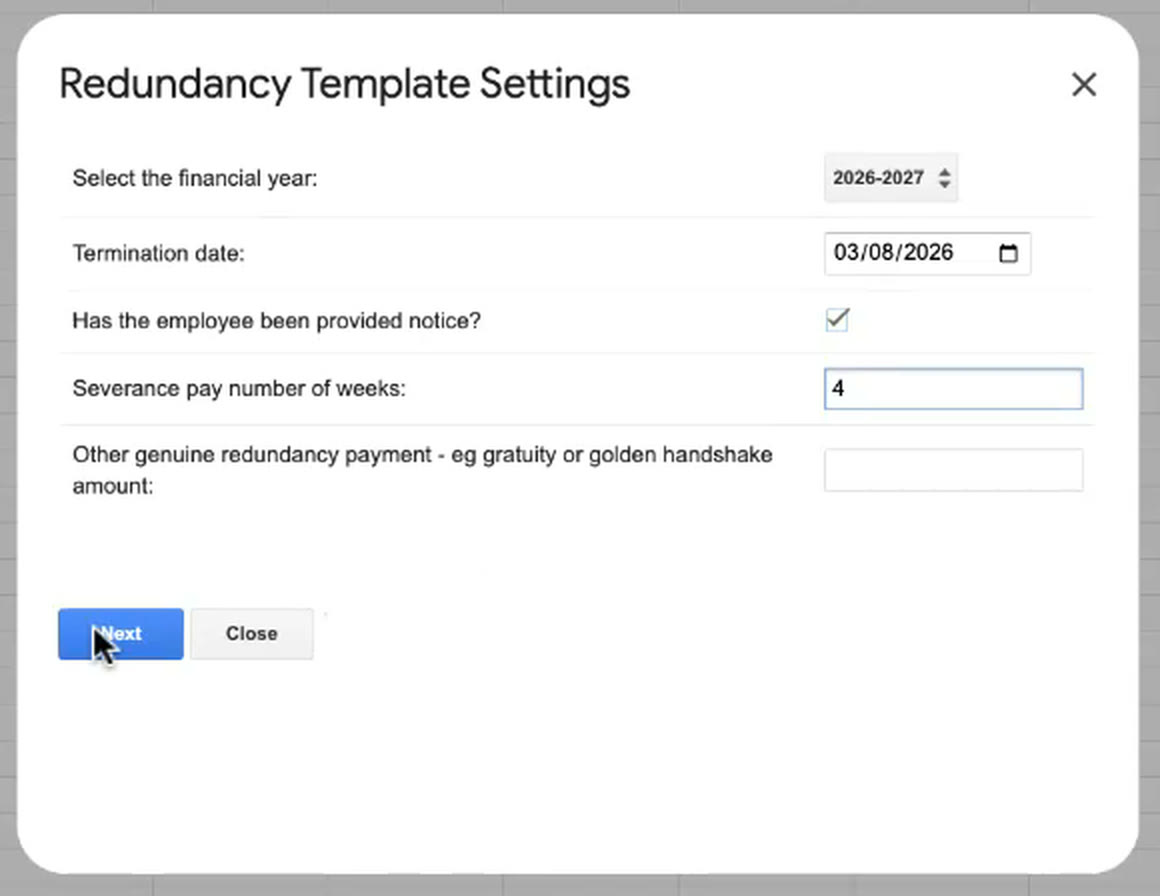
Choose the financial year and the termination date. Tick the box if the employee has been provided notice. Enter the severance pay in weeks and any other genuine redundancy payment, then click Next.
4
Choose the employee
Pick the employee from the list and click Generate Template. Toolbox adds a Redundancy: Payroll Worksheet tab.
5
Generate the HR worksheet
Go back to Redundancy Template and click Generate HR Worksheet. Toolbox adds a Redundancy: HR Worksheet tab. Do the payroll worksheet first.
What goes in, and what comes out?
You enter the termination details and choose the employee. The worksheets show the rest.
What you enter
Financial year Termination date Notice provided (tick box) Severance pay (weeks) Other genuine redundancy payment (amount) Employee (chosen from a list)
What the payroll worksheet shows
Employee details Date of birth Start date Age at termination Service period Base hourly rate Base weekly rate Annual leave Annual leave loading Long service leave Severance pay Payment in lieu of notice Tax free and taxable amounts Net payment
The worksheet's title says estimate only.
What the HR worksheet shows
✓Employee details, dates, hours and pay rates
✓Annual leave, leave loading and long service leave
✓Severance pay, payment in lieu of notice and any ex gratia amount
✓Tax free and taxable amounts, then a net payment
An example from the demo
✓A termination date of 3 August 2026 and 4 weeks of severance pay, with notice ticked as provided.
✓At a base weekly rate of $1,482.00, the 4 weeks come to $5,928.00 on the worksheet.
✓The employee's name, job title, date of birth and start date appear on the payroll worksheet once the employee is chosen.
What do the windows and worksheets look like?
The Settings window, then the two worksheet tabs it generates.
The Redundancy Template Settings window
The Redundancy: Payroll Worksheet tab
Further down the payroll worksheet
The Redundancy: HR Worksheet tab
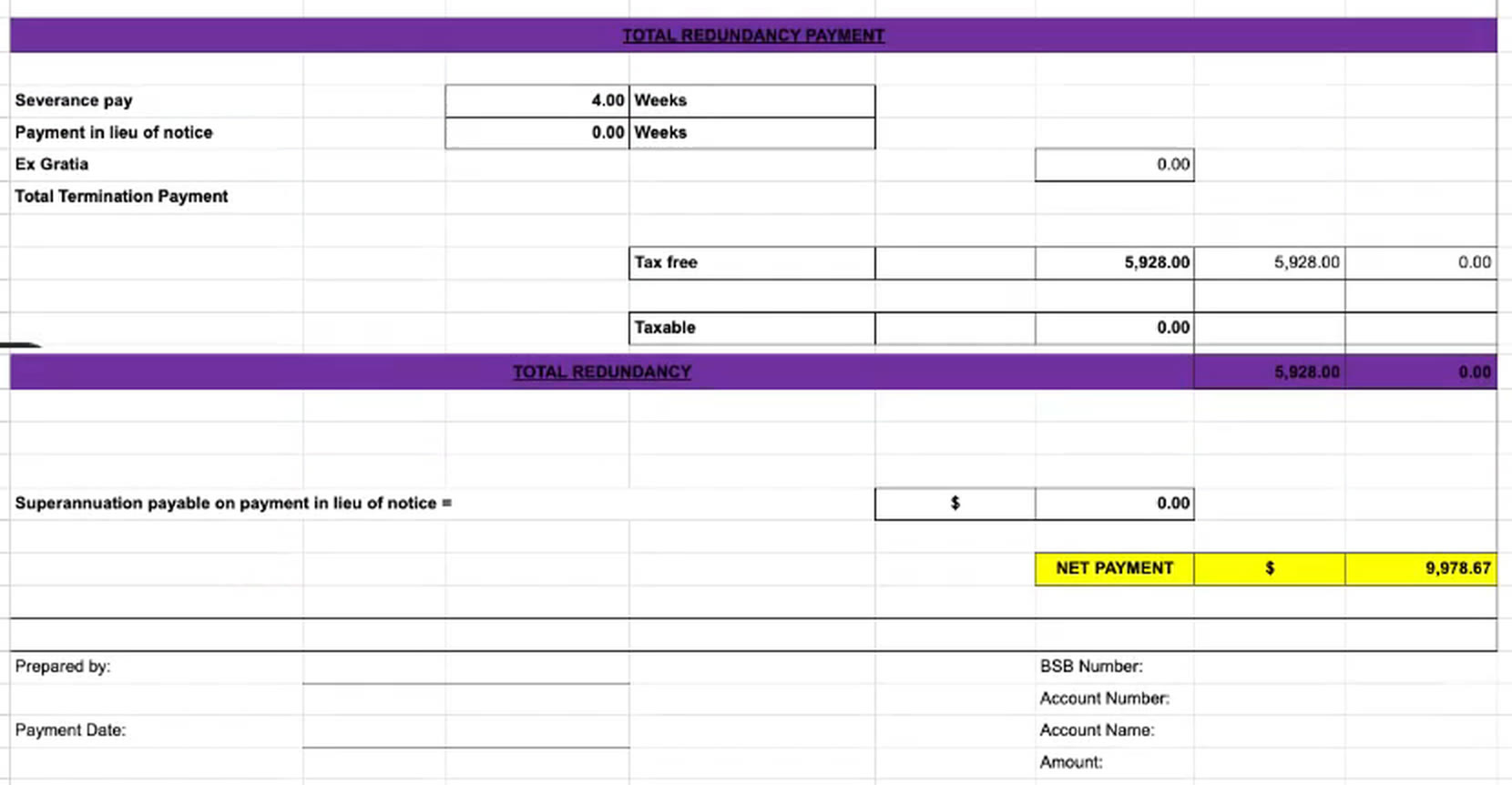
Sample data from a test business file. Some empty rows are trimmed from the HR worksheet image.
Already using Pay Cat?
Toolbox is ready to install. No demo, no waiting.
I'm a Pay Cat customer, take me to the Pay Cat Toolbox!What does it cost?
$2
per active employee per month
A provider with 40 active employees pays $80 a month on top of
their Pay Cat Payroll plan.
✓Added to your existing Pay Cat Payroll plan, with no new contract
✓Billed like Pay Cat Payroll: only for employees active that month
✓Includes every Toolbox report, including the portable long service leave report
✓New reports are added at no extra cost
Free webinar · Thursday 22 October 2026, 12pm AEDT
See Toolbox run live, all nine tools
Tasya, our Head Trainer, runs every Toolbox tool, including the salaried hours report, on a real business file. Live Q&A included. Can't make it? Register anyway and we'll send the recording.
Questions people ask before turning Toolbox on
It builds a redundancy worksheet in Google Sheets. You enter the termination details, choose the employee and Toolbox generates a payroll worksheet tab. A second menu option generates an HR worksheet tab.
The financial year, the termination date, whether the employee has been provided notice, the number of weeks of severance pay and any other genuine redundancy payment, such as a gratuity or golden handshake amount. Then you choose the employee from a list.
The employee's details and dates, their age and service period, annual leave and leave loading, long service leave, severance pay, payment in lieu of notice and any other genuine redundancy payment. It shows tax free and taxable amounts and ends in a net payment.
The payroll worksheet's title says estimate only. Check the figures before you make a payment.
A second tab, Redundancy: HR Worksheet, with the employee details, annual leave, long service leave, redundancy payment and net payment laid out for HR. Generate the payroll worksheet first. If you haven't, Toolbox shows a message asking you to.
In Google Sheets, go to Extensions, then the Toolbox menu, then Payroll, then Redundancy Template. Click Generate Template, enter the termination details and choose the employee. Then click Generate HR Worksheet for the HR tab.
Pay Cat Payroll with Toolbox is $11 per employee, per month. That covers the payroll platform and all nine Toolbox tools, Employee Updater through to the SCHADS 5-Week Annual Leave Assessment. There is no separate fee per tool.
Already on Pay Cat Payroll? Adding Toolbox is an extra $2 per employee, per month, taking your subscription from $9 to $11.
Toolbox is charged on your active employee count, the same basis as your Pay Cat Payroll subscription, and it is only available to Pay Cat customers with an active API key. See our pricing page for the full breakdown and exact terms.
Yes. Toolbox connects to your existing Pay Cat business file through your Pay Cat API key, so you'll need an active Pay Cat account with API access before you can set it up. If you're not yet a customer, book a demo and we'll show you how it fits in.
Install the app and click the link under "support" to access the set-up guide. Got questions? Reach out to support.
Yes, but a free Gmail account is enough, you don't need a paid Google Workspace subscription. Toolbox is a Google Sheets™ extension, so you'll need a Google account to install it and run it in a Google Sheet.
No. Everything runs from menus inside Google Sheets. If your team is comfortable in a spreadsheet, they're already comfortable in Toolbox.
No. Toolbox is built for Google Sheets only, not Excel. Once you've generated a report, though, Google Sheets can export it straight to XLSX format if you need the file in Excel.
Ready to get Toolbox working for your team?
Two ways in, depending on where you are with Pay Cat.
Already with Pay Cat
Add Toolbox to my accountNo demo needed. Install straight from the Google Workspace Marketplace.
New to Pay Cat
Book a demoSee Toolbox running against a real business file, alongside the rest of Pay Cat.