

Pay Cat Toolbox · Salaried hours report
See every employee's hours next to their contracted hours.
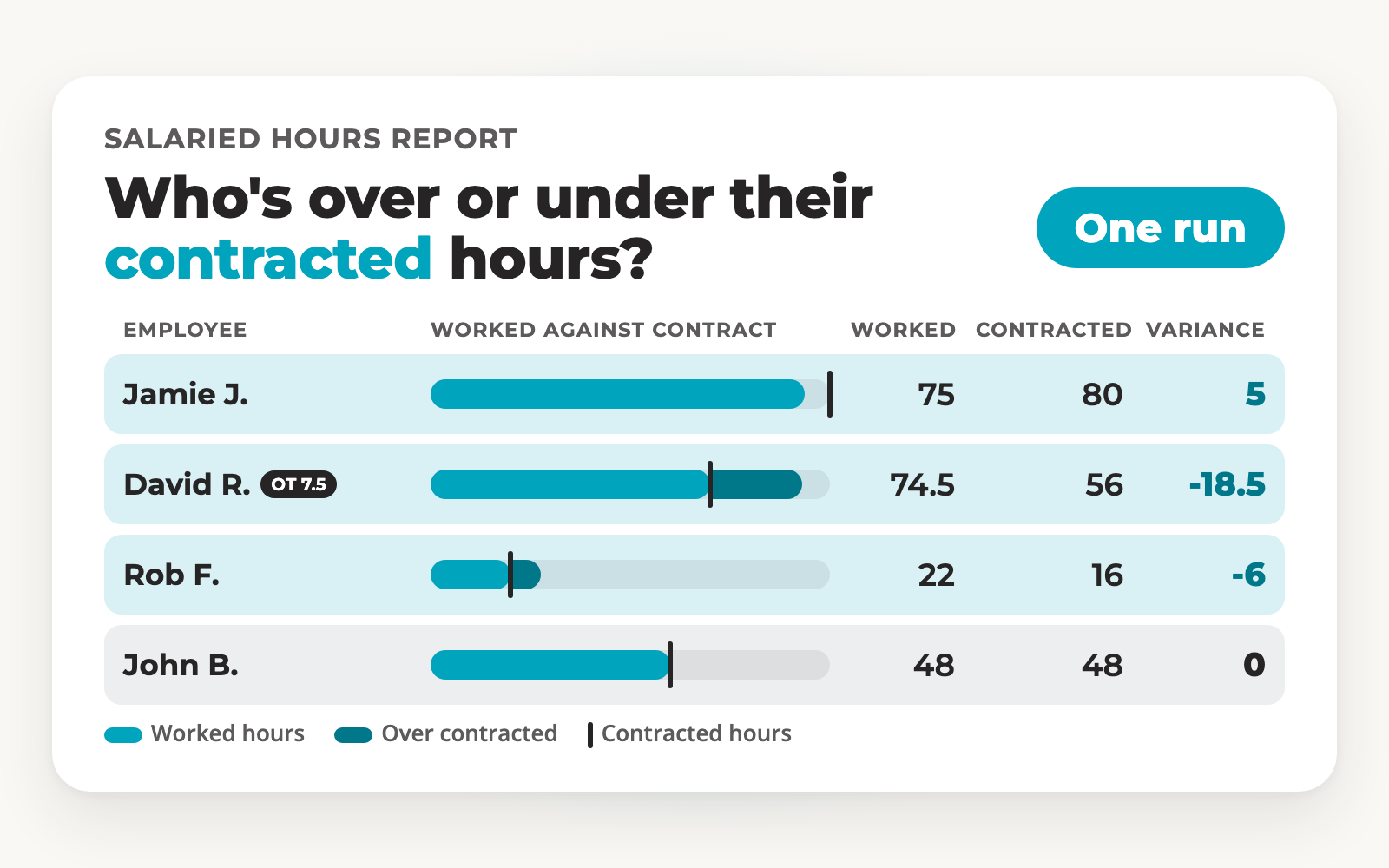
Pick a pay run and Toolbox builds a sheet from your Pay Cat Payroll file. It shows worked, ordinary and overtime hours, paid and unpaid leave, contracted hours and the variance, one row per employee.
Run it on the pay run you choose
$2 per active employee per month, added to your Pay Cat Payroll plan. No new contract.
Not on Pay Cat Payroll yet? Book a demo
Why is it hard to check salaried hours?
A salary looks the same every pay run, so the hours behind it are easy to lose sight of.
The pay stays the same, the hours don't
A salary looks identical every pay run. The hours behind it can run above or below what was agreed without anyone noticing.
Leave changes the picture
Paid leave and unpaid leave both affect the hours someone worked in a pay period, so a raw total doesn't tell the whole story.
Checking by hand is slow
Comparing each person to their contract means pulling hours, leave and contracted hours from different places into one sheet, every pay run.
Toolbox puts all of it in one sheet, for the pay run you choose.
See it in action
Watch a salaried hours report go from pay run to sheet
Under a minute, start to finish.
How does Toolbox build the report?
Three steps. You only connect once.
1
Connect once
Install Toolbox in Google Sheets and paste in your Pay Cat Payroll API key. That's the most technical it gets.
2
Choose your pay run
Open Pay Cat Toolbox from the Extensions menu and choose Salaried Hours Report. Select the pay run, and tick the option to show ordinary hours as their own column if you want it.
3
Generate and review
Click Generate Report. A new tab appears, named after the pay run, with one row per employee.
What's in the salaried hours report?
One row per employee, in four groups of columns.
Who
Employee ID External ID First name Last name Employment type Location Job title
Hours
Worked hours Ordinary hours OT hours
Leave
Paid leave hours Unpaid leave hours
Compare
Contracted hours Variance
What does the finished report look like?
A new tab in your Google Sheet, named after the pay run you chose.

Sample data from a test business file.
Already using Pay Cat?
Toolbox is ready to install. No demo, no waiting.
I'm a Pay Cat customer, take me to the Pay Cat Toolbox!What does it cost?
$2
per active employee per month
A provider with 40 active employees pays $80 a month.
✓Added to your existing Pay Cat Payroll plan, with no new contract
✓Billed like Pay Cat Payroll: only for employees active that month
✓Includes every Toolbox report, including the portable long service leave report
✓New reports are added at no extra cost
Free webinar · Thursday 22 October 2026, 12pm AEDT
See Toolbox run live, all nine tools
Tasya, our Head Trainer, runs every Toolbox tool, including the salaried hours report, on a real business file. Live Q&A included. Can't make it? Register anyway and we'll send the recording.
Questions people ask before turning Toolbox on
For the pay run you choose, it lists each employee with their worked, ordinary and overtime hours, their paid and unpaid leave hours, their contracted hours and the variance, one row per employee.
You choose it when you run the report, from the Payrun ID list in the Toolbox settings. Run it again and pick a different pay run to look at another period.
In a new tab in your Google Sheet, named after the pay run. Your other tabs stay as they are.
Tick "Display ordinary hours as a column?" before you generate the report and ordinary hours appear as their own column.
Pay Cat Payroll with Toolbox is $11 per employee, per month. That covers the payroll platform and all nine Toolbox tools, Employee Updater through to the SCHADS 5-Week Annual Leave Assessment. There is no separate fee per tool.
Already on Pay Cat Payroll? Adding Toolbox is an extra $2 per employee, per month, taking your subscription from $9 to $11.
Toolbox is charged on your active employee count, the same basis as your Pay Cat Payroll subscription, and it is only available to Pay Cat customers with an active API key. See our pricing page for the full breakdown and exact terms.
Yes. Toolbox connects to your existing Pay Cat business file through your Pay Cat API key, so you'll need an active Pay Cat account with API access before you can set it up. If you're not yet a customer, book a demo and we'll show you how it fits in.
Install the app and click the link under "support" to access the set-up guide. Got questions? Reach out to support.
Yes, but a free Gmail account is enough, you don't need a paid Google Workspace subscription. Toolbox is a Google Sheets™ extension, so you'll need a Google account to install it and run it in a Google Sheet.
No. Everything runs from menus inside Google Sheets. If your team is comfortable in a spreadsheet, they're already comfortable in Toolbox.
No. Toolbox is built for Google Sheets only, not Excel. Once you've generated a report, though, Google Sheets can export it straight to XLSX format if you need the file in Excel.
Ready to get Toolbox working for your team?
Two ways in, depending on where you are with Pay Cat.
Already with Pay Cat
Add Toolbox to my accountNo demo needed. Install straight from the Google Workspace Marketplace.
New to Pay Cat
Book a demoSee Toolbox running against a real business file, alongside the rest of Pay Cat.