

Pay Cat Toolbox · Wage Accrual Report
Your month's wage accrual figures, laid out for you.
Cost, hours and SGC line by line for each employee, consolidated by location and pay category, with the pay schedule dates beside them. Nothing to build by hand.
Detail by employee, location and pay schedule
$2 per active employee per month, added to your Pay Cat Payroll plan. No new contract.
Not on Pay Cat Payroll yet? Book a demo
Why is a wage accrual report hard to put together?
It draws on pay schedules, timesheets and pay categories, and the detail sits in different places.
Each pay schedule has its own dates
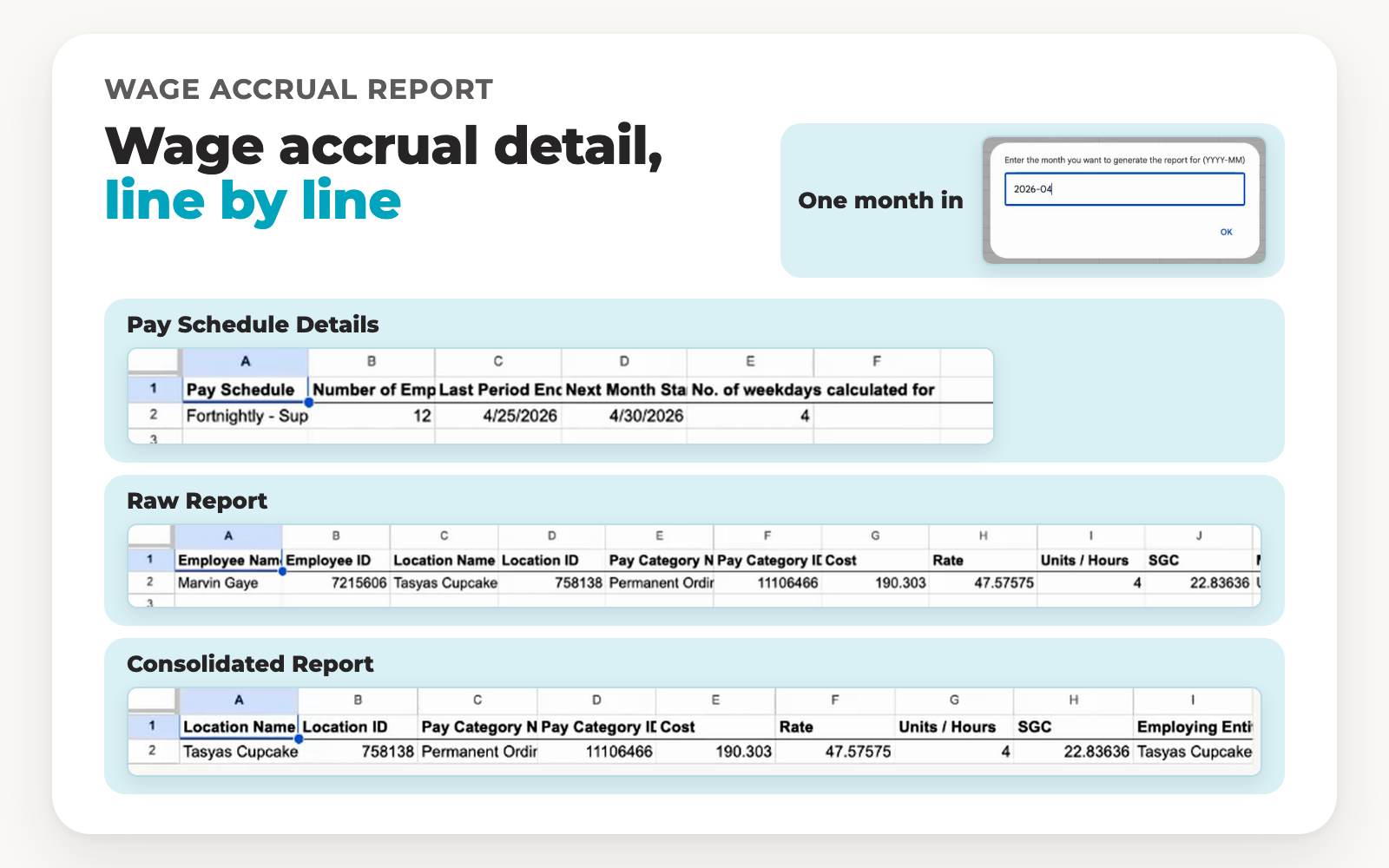
The report lists each pay schedule with its last period end and the number of weekdays it calculated for.
The costs sit line by line
Each line shows the employee, location, pay category, cost, rate, hours and SGC, along with the method of calculation and the start time.
Pay category names carry detail
A pay category name on the report includes the award code and the leave loading and earnings figures behind the line.
Toolbox lays all of this out in three tabs in your Google Sheet.
See it in action
Watch the Wage Accrual Report build its three tabs
A short video, under a minute. Choose a month and watch the Pay Schedule Details, Raw Report and Consolidated Report tabs appear.
How does the Wage Accrual Report work?
Five steps. You only connect once.
1
Connect once
Install Toolbox in Google Sheets and paste in your Pay Cat Payroll API key. That's the most technical it gets.
2
Open the report
Go to Extensions, then the Toolbox menu, then Accounting, then Wage Accrual Report, and click Generate Report.
3
Enter the month
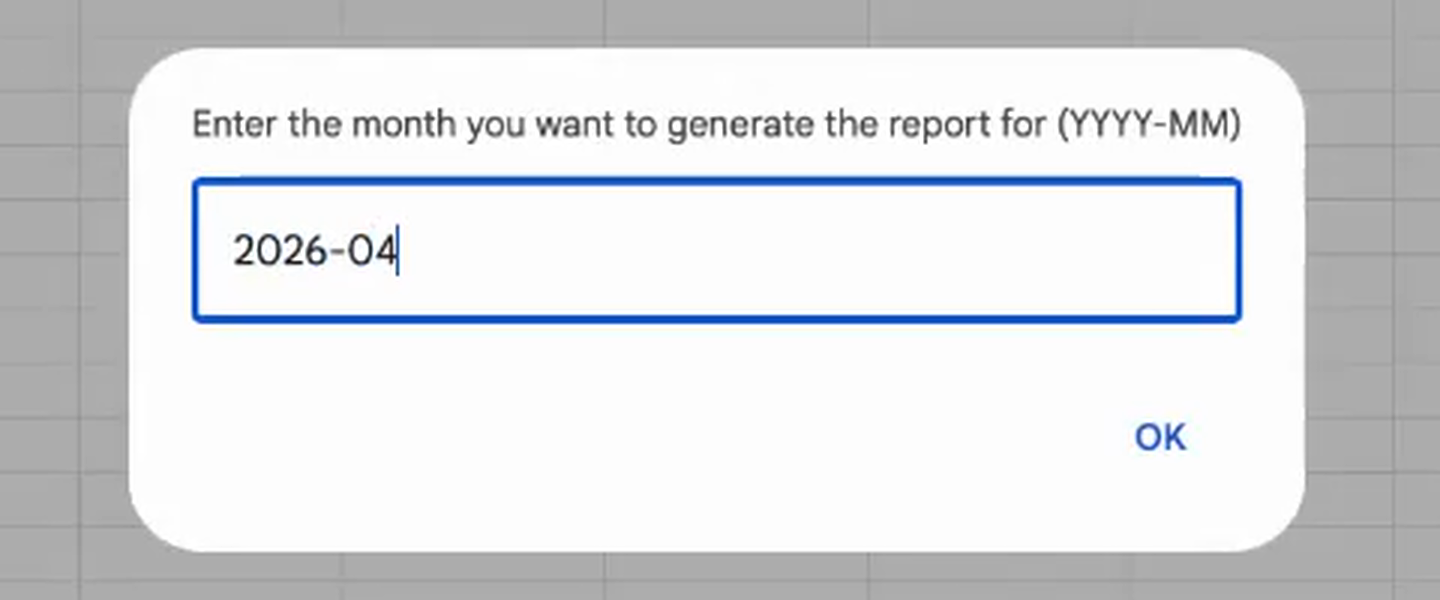
A prompt asks for the month you want to generate the report for. Type it as YYYY-MM, for example 2026-04, and click OK.
4
Wait for the tabs
A Working message shows at the bottom left while Toolbox adds the report tabs to your sheet.
5
Read the three tabs
Wage Accrual: Pay Schedule Details, Wage Accrual: Raw Report and Wage Accrual: Consolidated Report each sit in their own tab.
What goes in, and what comes out?
You enter one month. The three tabs show the rest.
What you enter
Month (YYYY-MM)
Pay Schedule Details tab
Pay schedule Number of employees Last period end Weekdays calculated for
Raw Report tab
Employee name Employee ID Location name Location ID Pay category name Pay category ID Cost Rate Units / hours SGC Method of calculation Start time / date Pay schedule Employing entity ID Employing entity name
Consolidated Report tab
Location name Location ID Pay category name Pay category ID Cost Rate Units / hours SGC Employing entity
An example from the demo
✓The month entered is 2026-04. Pay Schedule Details shows one pay schedule with a last period end of 25 April 2026 and 4 weekdays calculated for.
✓The Raw Report shows one line: 4 units / hours at a rate of 47.57575, a cost of 190.303 and an SGC of 22.83636. The method of calculation reads Unpaid timesheet, with a start of 2026-04-30 9:00.
✓The Consolidated Report shows the same cost, rate, hours and SGC against the location and pay category.
What do the prompt and the report tabs look like?
The month prompt, then the three tabs it generates.
The month prompt
The three tabs

Wage Accrual: Pay Schedule Details

Wage Accrual: Raw Report

The Raw Report with the Pay Category Name column widened

Wage Accrual: Consolidated Report

Sample data from a test business file. Column widths are as they appear on screen.
Already using Pay Cat?
Toolbox is ready to install. No demo, no waiting.
I'm a Pay Cat customer, take me to the Pay Cat Toolbox!What does it cost?
$2
per active employee per month
A provider with 40 active employees pays $80 a month on top of
their Pay Cat Payroll plan.
✓Added to your existing Pay Cat Payroll plan, with no new contract
✓Billed like Pay Cat Payroll: only for employees active that month
✓Includes every Toolbox report, including the portable long service leave report
✓New reports are added at no extra cost
Free webinar · Thursday 22 October 2026, 12pm AEDT
See Toolbox run live, all nine tools
Tasya, our Head Trainer, runs every Toolbox tool, including the salaried hours report, on a real business file. Live Q&A included. Can't make it? Register anyway and we'll send the recording.
Questions people ask before turning Toolbox on
It builds a wage accrual report in Google Sheets for the month you enter. Toolbox adds three tabs to your sheet: Wage Accrual: Pay Schedule Details, Wage Accrual: Raw Report and Wage Accrual: Consolidated Report.
The month you want to generate the report for, in YYYY-MM format, for example 2026-04. That is the only thing the prompt asks for.
Pay Schedule Details lists each pay schedule with its last period end and the weekdays calculated for. The Raw Report lists employee, location, pay category, cost, rate, units / hours and SGC, along with the method of calculation, start time and employing entity. The Consolidated Report shows the location, pay category, cost, rate, units / hours and SGC.
Go to Extensions, then the Toolbox menu, then Accounting, then Wage Accrual Report, and click Generate Report.
It shows a method of calculation column, which reads Unpaid timesheet for the line in the demo. The pay category name also includes the leave loading and earnings figures behind the line.
Pay Cat Payroll with Toolbox is $11 per employee, per month. That covers the payroll platform and all nine Toolbox tools, Employee Updater through to the SCHADS 5-Week Annual Leave Assessment. There is no separate fee per tool.
Already on Pay Cat Payroll? Adding Toolbox is an extra $2 per employee, per month, taking your subscription from $9 to $11.
Toolbox is charged on your active employee count, the same basis as your Pay Cat Payroll subscription, and it is only available to Pay Cat customers with an active API key. See our pricing page for the full breakdown and exact terms.
Yes. Toolbox connects to your existing Pay Cat business file through your Pay Cat API key, so you'll need an active Pay Cat account with API access before you can set it up. If you're not yet a customer, book a demo and we'll show you how it fits in.
Install the app and click the link under "support" to access the set-up guide. Got questions? Reach out to support.
Yes, but a free Gmail account is enough, you don't need a paid Google Workspace subscription. Toolbox is a Google Sheets™ extension, so you'll need a Google account to install it and run it in a Google Sheet.
No. Everything runs from menus inside Google Sheets. If your team is comfortable in a spreadsheet, they're already comfortable in Toolbox.
No. Toolbox is built for Google Sheets only, not Excel. Once you've generated a report, though, Google Sheets can export it straight to XLSX format if you need the file in Excel.
Ready to get Toolbox working for your team?
Two ways in, depending on where you are with Pay Cat.
Already with Pay Cat
Add Toolbox to my accountNo demo needed. Install straight from the Google Workspace Marketplace.
New to Pay Cat
Book a demoSee Toolbox running against a real business file, alongside the rest of Pay Cat.